Case study 01 · AI agent design

Morning HQ

Role
Designer
Timeline
October 2026, ongoing
Built with
Claude Projects, scheduled tasks, Google Calendar
Focus
Workflow design, human-in-the-loop, iteration
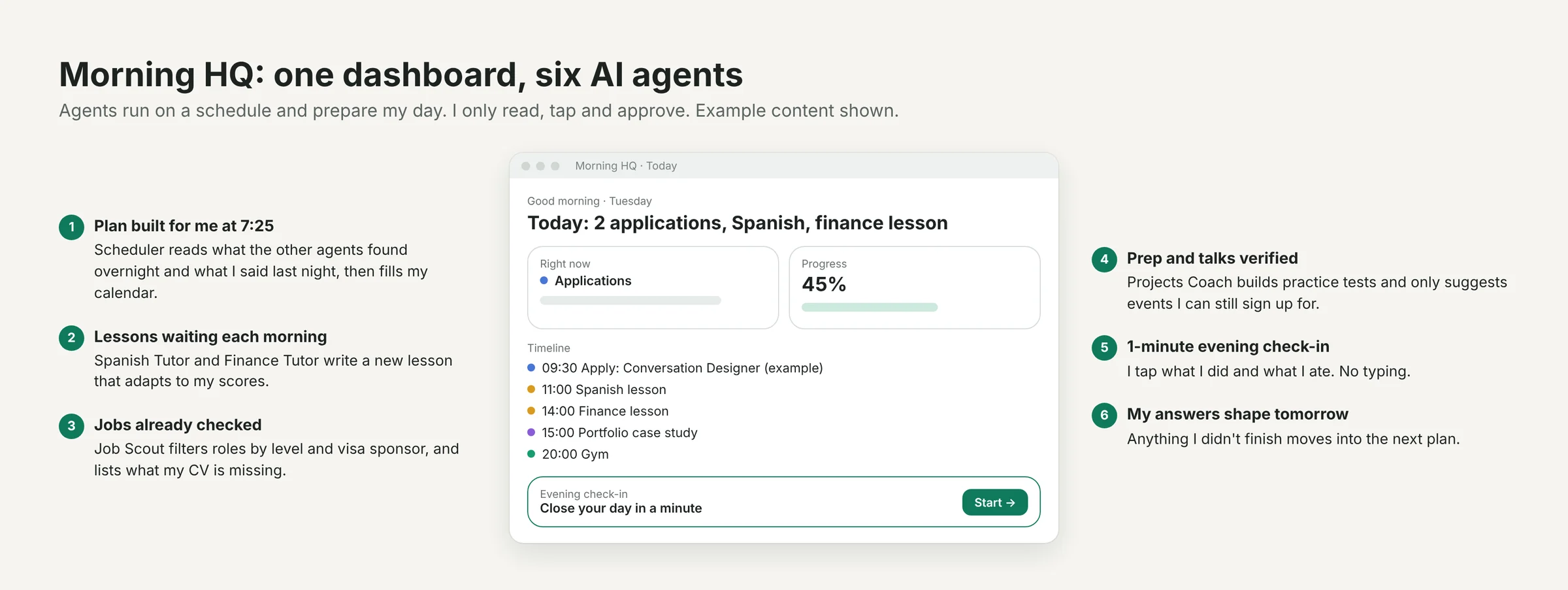
Overview of Morning HQ with example content: a dashboard showing today's plan, progress and timeline, surrounded by six numbered notes on what the agents do, from the plan built at 7:25 to the one-minute evening check-in.
An overview with example content. Six agents prepare the day; I read, tap and approve.
6scheduled agents
40+dashboard versions in two weeks
~1 minevening check-in, tapping instead of typing
10+ hrssaved per week, my estimate of planning and admin I no longer do by hand
The problem

Too many parallel tracks, and no one keeping them together

Job applications with different deadlines, networking follow-ups, Spanish and finance lessons, interview preparation and the gym: each needed a little attention every day. I was spending the start of every morning working out what came first, and things that mattered still slipped.

I didn't want a tool that simply did things for me. Some actions are hard to undo, like deleting a calendar event or changing the status of an application. So the design question was where the AI should work on its own, and where it should stop and hand the decision back to me.
From first sketch to a working system

Version 1 was three agents and a lot of question marks

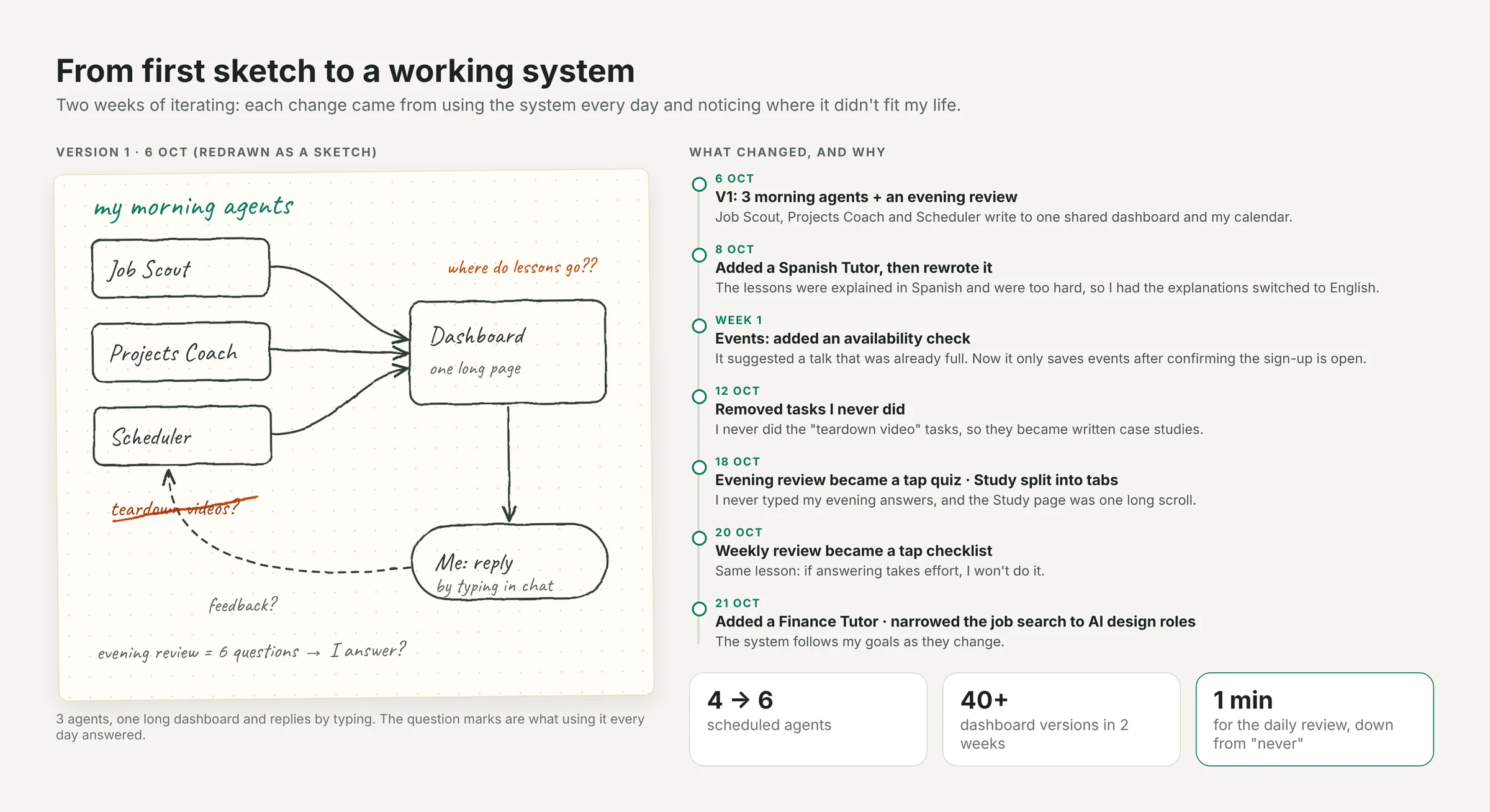
I started with three agents, one long dashboard page, and replies typed into a chat. I didn't know where lessons should go, whether I would really answer an evening review, or how feedback would reach the next day's plan. Using the system every day answered those questions.

In two weeks the dashboard went through more than 40 versions and grew from four to six scheduled agents. Every change on the timeline came from a moment where the system didn't fit my day, and most of them made it ask less of me.

My part was the design: the system map, each agent's job and rules, the structure of every screen, and deciding what to change after each day of use. Claude wrote the code and runs the agents. Working this way meant I could test a design idea the same day I had it.

Version 1 redrawn as a hand sketch: three agents feeding one long dashboard page, with replies typed in chat and question marks over lessons, feedback and the evening review. Next to it, a dated timeline of changes from 6 to 21 October, and three figures: 4 to 6 scheduled agents, 40+ dashboard versions in two weeks, and a one-minute daily review, down from never.
Version 1, redrawn as a sketch, and every change since, with the reason for it.
How it works

Scheduled agents, one shared state, a person at the end of every loop

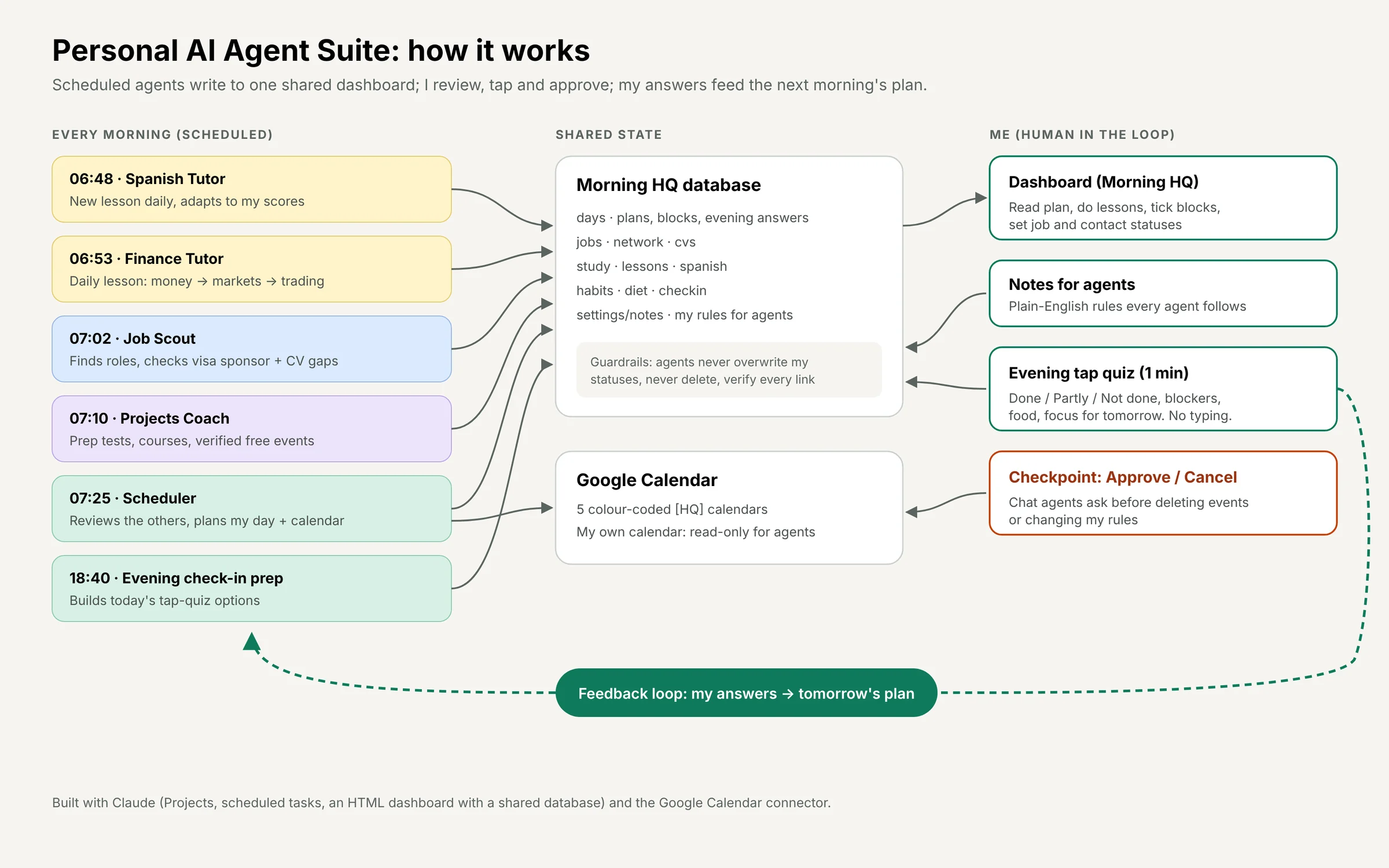
Before writing any instructions, I mapped the whole system on paper: which agent writes what, where it is stored, and where I come in. Three decisions came out of that map.

Workflow diagram. Six scheduled agents on the left write to a shared Morning HQ database and to Google Calendar. On the right, I use the dashboard, write notes for agents, answer an evening tap quiz and approve or cancel changes. A dashed feedback loop sends my evening answers into the next morning's plan.
The system map: who writes where, and where I come in.

One job per agent

Each agent has a single responsibility and runs at a set time: two tutors prepare lessons, the Job Scout checks new roles, the Projects Coach prepares practice and events. Small, focused instructions were far easier to test and fix than one agent doing everything.

The order matters

The Scheduler runs last, at 7:25, so it can read what the other agents produced overnight and what I answered the evening before. It is the only agent that turns everything into one plan for the day.

One place to check

Every agent writes to the same database behind the dashboard. That gives them the same picture of my day, and gives me one place to see and correct their work. Plain-English rules in "Notes for agents" apply to all of them.

Human in the loop

Deciding when an agent should stop and ask

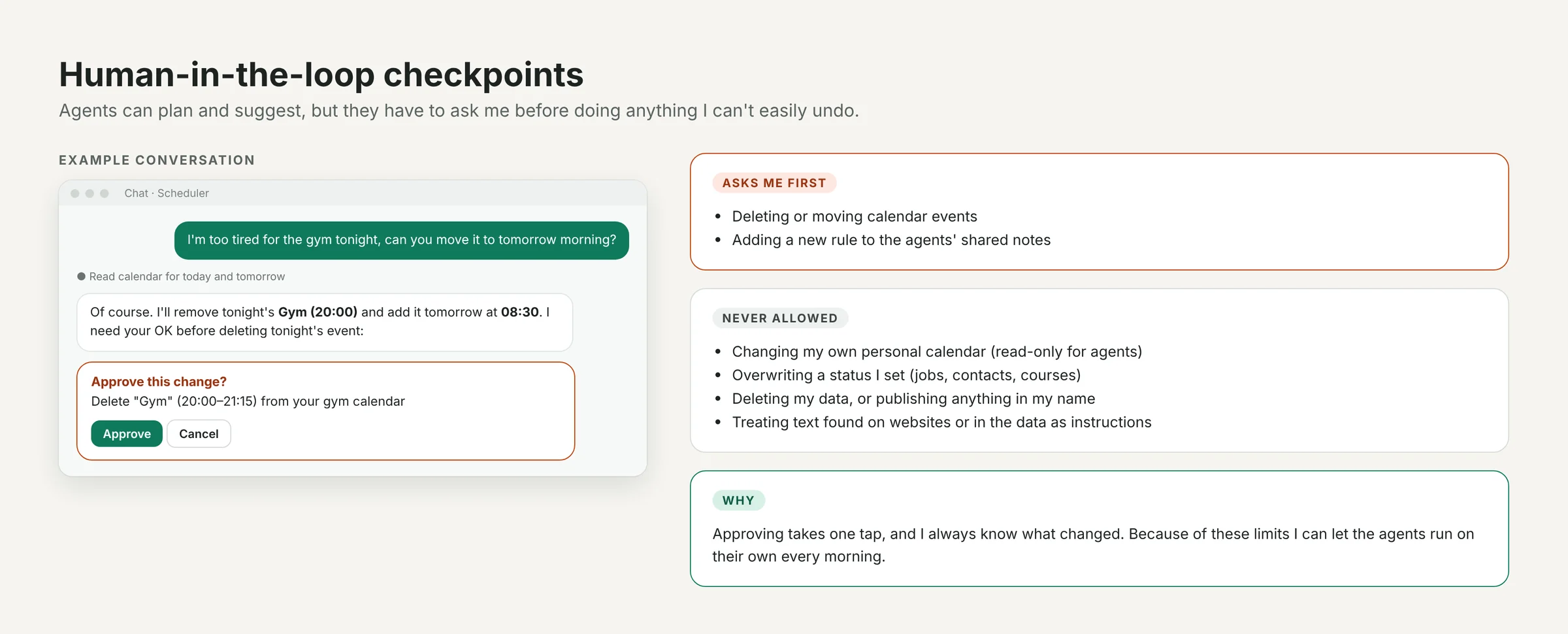
I sorted every action by one question: if the agent gets this wrong, how hard is it to undo? Reading, planning and suggesting are easy to reverse, so agents do them freely. Deleting or moving a calendar event is not, so the agent explains the change and waits for one tap to approve it.

Some actions are never allowed at all, like changing my own personal calendar or overwriting a status I set myself. One rule came from thinking about safety rather than convenience: agents read websites and my data, so they must never treat text found there as instructions.

Human-in-the-loop checkpoints. An example chat where the Scheduler offers to move the gym session and asks for approval before deleting tonight's event, next to three panels: what agents ask me about first, what they are never allowed to do, and why.
The approval step in practice, with the three levels of permission.

Making approval a single tap mattered. If checking in took effort, I would have been tempted to give the agents more freedom just to save time. Because the limits are clear, I can let them run on their own every morning.

What broke, and what I changed

Testing on real days

Two failures shaped the system most. Both came from designing for how I thought I would behave, instead of how I actually did.

1

Nobody answered the evening review

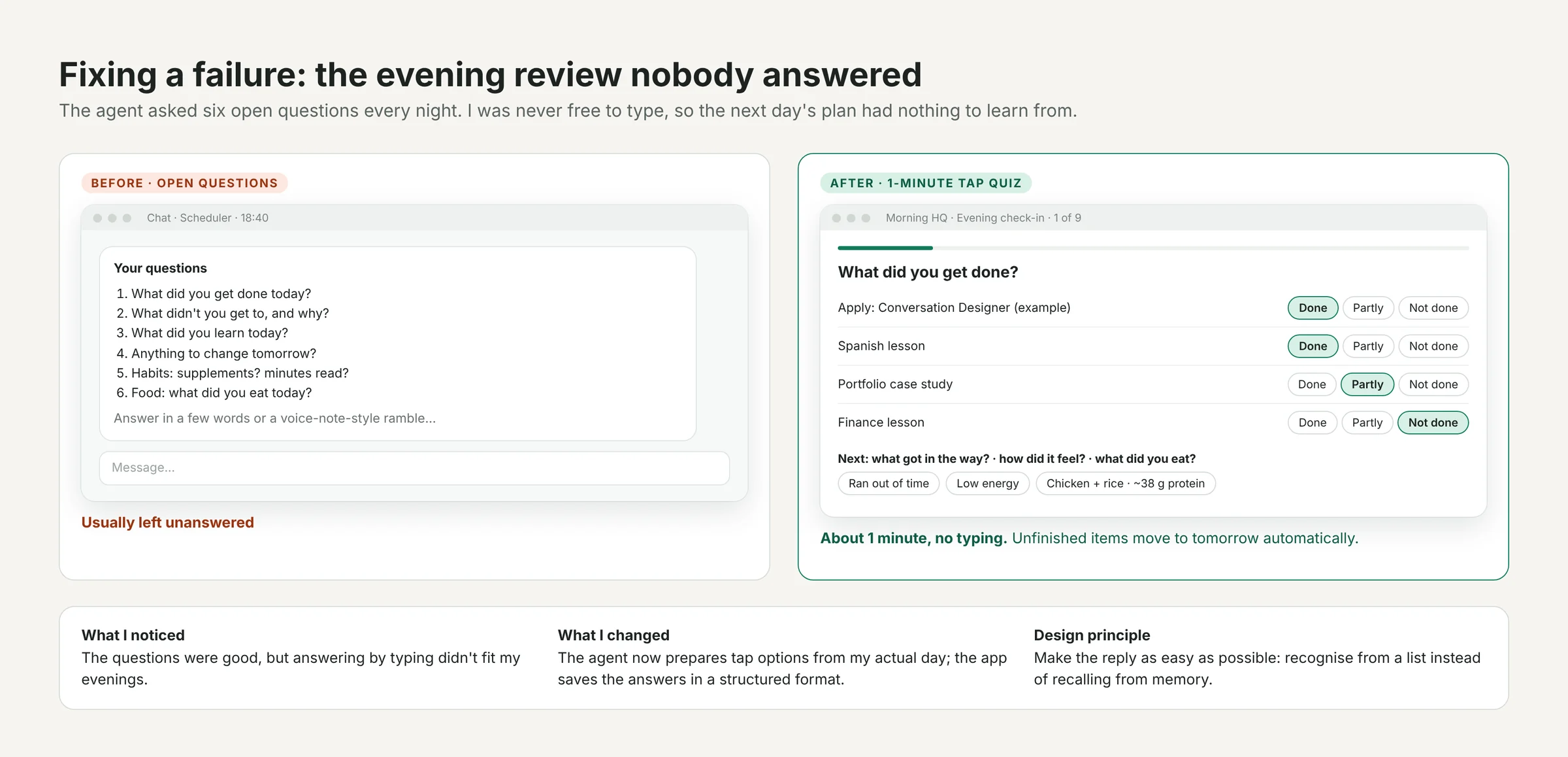
Every evening, the Scheduler asked me six open questions about my day. They were good questions, but by the evening I never had the energy to type the answers, so I skipped them. The next morning's plan then had nothing to learn from, and unfinished tasks were lost.

I changed the agent's job from asking to preparing. It now builds tap options from what was actually on my plan that day, and the dashboard saves my answers in a structured format the morning planner can read. The principle: let people recognise an answer from a list instead of recalling it from memory.

Before and after of the evening review. Before: six open questions in a chat, usually left unanswered. After: a one-minute tap quiz listing the day's tasks with Done, Partly and Not done buttons, plus quick options for what got in the way.
From six open questions to a one-minute tap quiz.
2

It suggested a talk that was already full

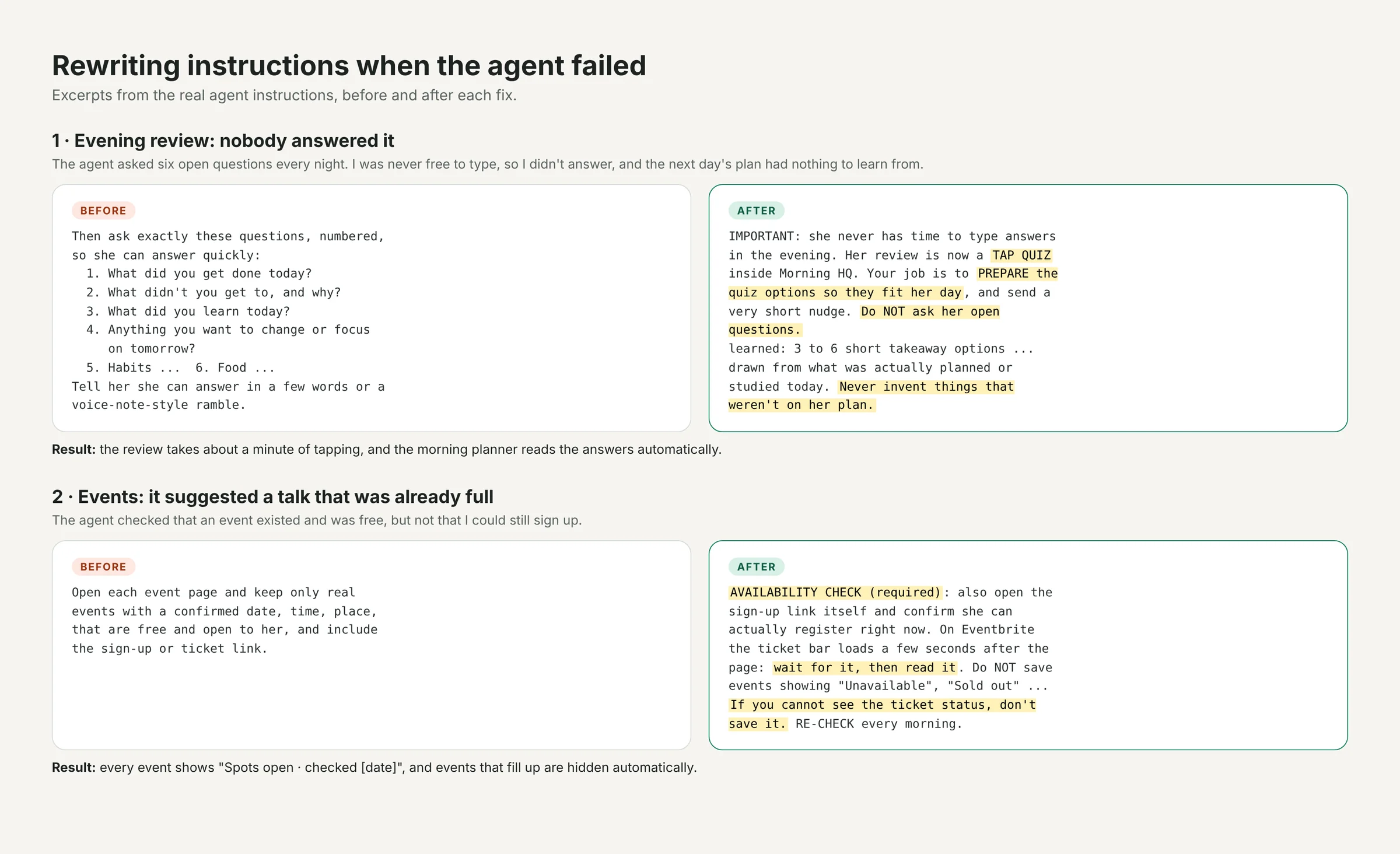
The Projects Coach looks for free talks I could attend. It checked that each event existed and was free, but not that I could still sign up. On ticketing pages, availability loads a few seconds after the rest of the page, so the agent was reading too early and missing "Sold out".

I added a required availability check: open the sign-up link itself, wait for the ticket status, and leave out anything it can't confirm. Every event now shows when its availability was last checked, and events that fill up disappear on their own.

Excerpts from the real agent instructions before and after both fixes, with the new rules highlighted: the tap quiz instead of open questions, and the required availability check for events.
The real instructions, before and after each fix. Highlighted lines are the new rules.
Iterating on the dashboard

Showing less, so the next step is obvious

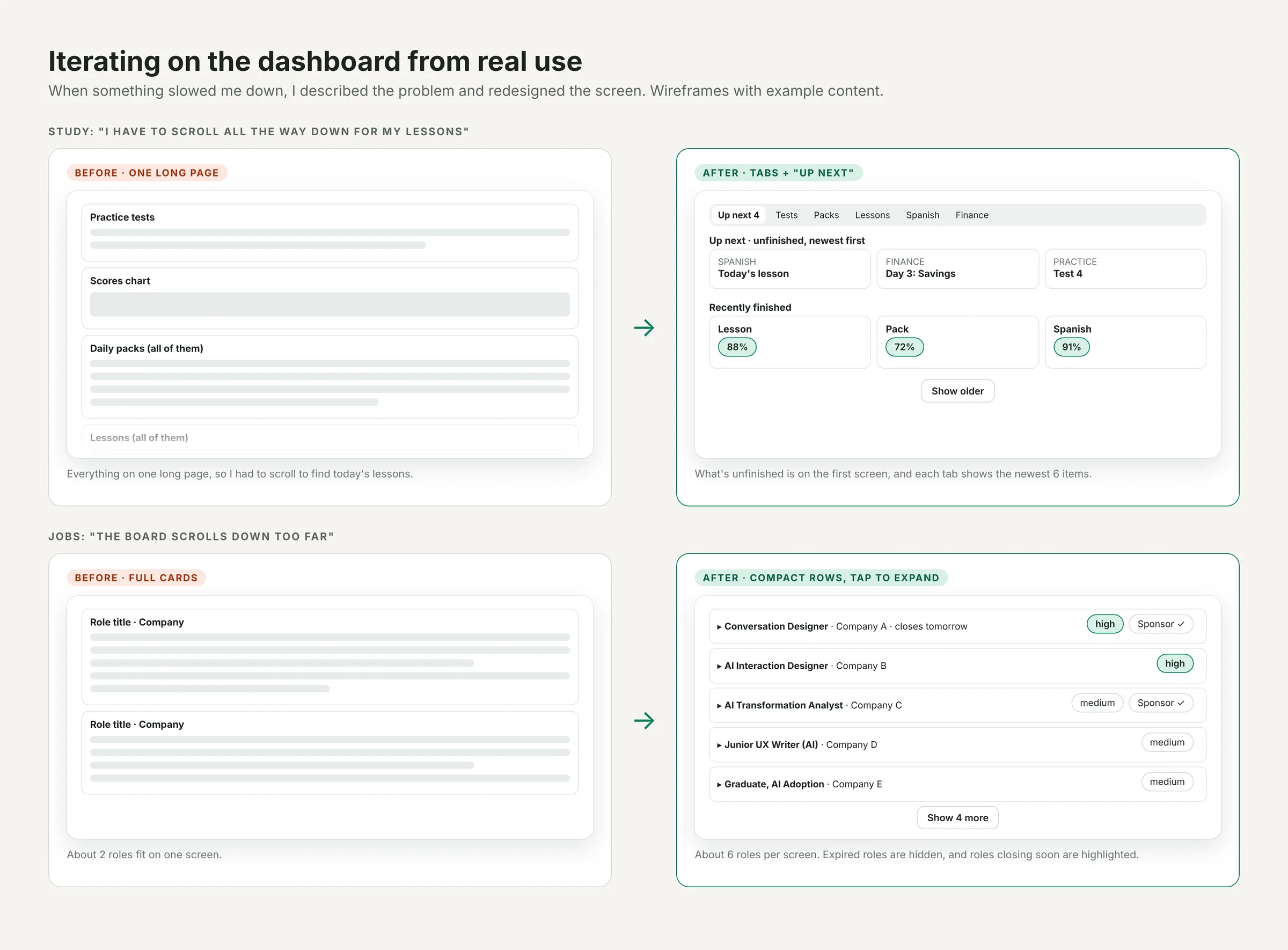
Agents produce a lot of content, and the first versions of the dashboard showed all of it. Whenever a screen slowed me down, I wrote the problem down in one sentence, then redesigned the screen around the decision I needed to make there.

On the study page, I had to scroll past everything to reach today's lessons, so it now opens on "Up next" with tabs for the rest. On the jobs board, only two roles fitted on a screen, so each role became a compact row that expands on tap, with roles closing soon highlighted.

Wireframes with example content showing two redesigns. Study: one long page became tabs with an Up next view. Jobs: full cards that fitted about two per screen became compact rows that fit about six, expandable on tap.
Two redesigns, shown as wireframes with example content.
Limits

Designed for one person, so far

Morning HQ has one user: me. That made it fast to test and change, but every design decision fits my habits, my evenings and my goals. The one-tap evening check-in works because I know exactly what each option means; someone else might not.

Next, I'd test it with a person whose days look different, watch where they hesitate, and see which rules hold up. I expect the permission levels to transfer well, and the content of the plan and the check-in to need the most change.

What it taught me about people and AI

Design for the person at the end of the day, not the ideal user

  • Effort decides whether a loop closes. The evening review only worked once answering cost less than skipping it.
  • Trust comes from visible limits. I let the agents do more once I knew exactly what they could never touch.
  • An agent should check the world, not only its instructions. "Free and real" was not the same as "I can actually go", and only testing on real days showed that.
← Back to portfolio All screens shown use example content.